
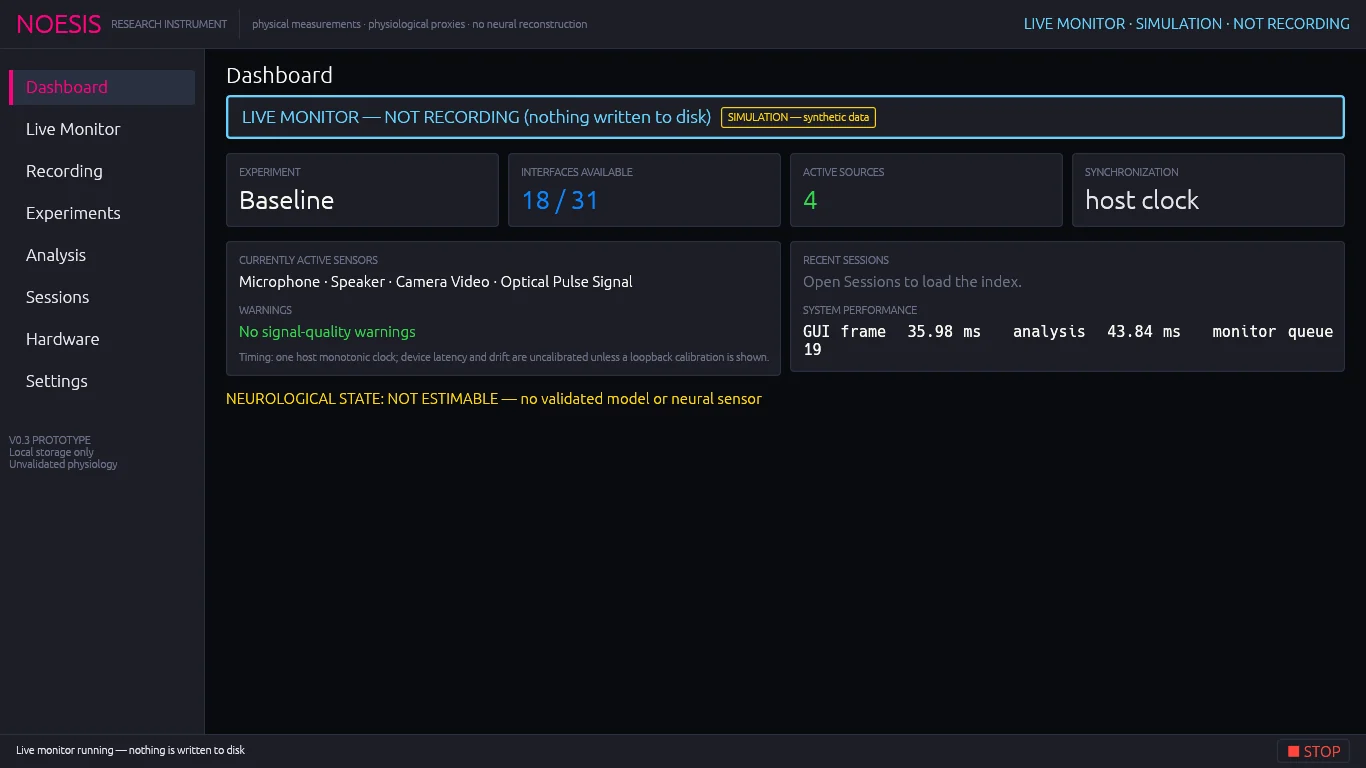
Status tiles#
| Tile | Shows |
|---|---|
| Experiment | The protocol selected for the next (or running) session. |
| Interfaces available | Usable interfaces / all interface types in the capability matrix (for example 18 / 31). |
| Active sources | How many sources are streaming right now. Green when above zero. |
| Synchronization | host clock, or loopback measured after a loopback calibration in this console session. |
Currently active sensors and warnings#
- Currently active sensors lists every streaming source by name. It reads “None — start the Live Monitor or a recording” when idle.
- Warnings collects every source whose signal-quality text is a caution or error (for example a silent microphone, clipping, a stale sensor or a device error) and any data loss: Data loss: N acquisition, N recorder drops. Green text confirms there are no warnings.
- The timing line states the synchronization basis: one host monotonic clock, with device latency and drift uncalibrated until a loopback calibration is run.
Recent sessions and performance#
- Recent sessions shows the five newest sessions as age · experiment · duration · status. If it reads “Open Sessions to load the index”, open Sessions once.
- System performance shows the GUI frame time, analysis time, monitor queue depth, CPU usage and memory usage.
Tip
The Dashboard updates live. Leave it open during long recordings to watch for warnings and drops without the detail of the Live Monitor.