Toolbar#
| Control | Action |
|---|---|
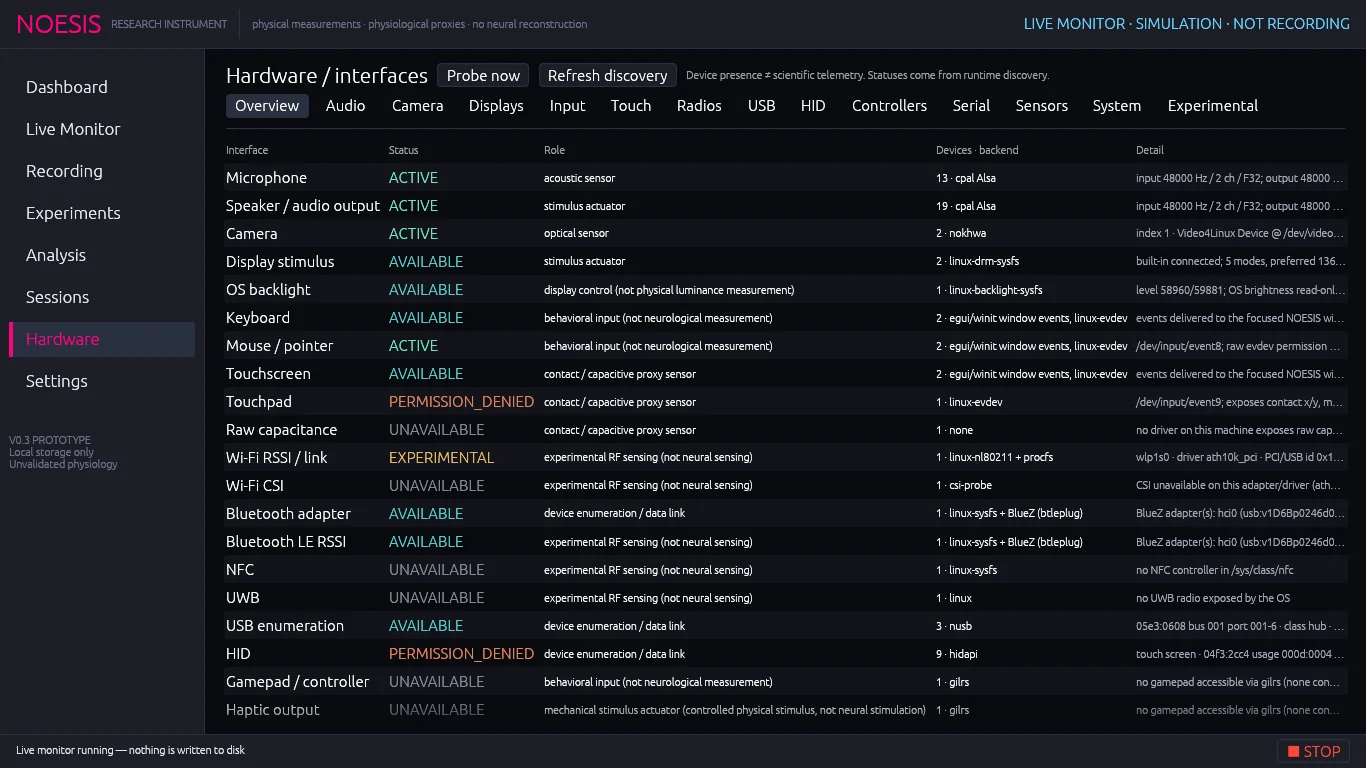
| Probe now | Takes one live reading from every pollable sensor and shows it in the readings tables. Not recorded. |
| Refresh discovery | Re-scans all hardware (after plugging something in) and re-probes telemetry. |
| Section tabs | Overview, Audio, Camera, Displays, Input, Touch, Radios, USB, HID, Controllers, Serial, Sensors, System, Experimental. |
Device tables#
Most sections show a device table with these columns:
- Use — untick to exclude that device from future sessions.
- Status — the device's status pill.
- Device — friendly name, secondary description, manufacturer and a SIMULATED pill if applicable.
- Capabilities — what it can be read for (reads), what it can be controlled with (controls), its rate and timing notes. With Technical Details on: ID, backend and driver detail. Otherwise unavailable devices show the reason.
In readings tables, click a channel name to plot its recent history.
Sections#
Overview Capability matrix
One row per interface type: interface, status, scientific role, device count and the telemetry it provides (or backends and detail with Show Technical Details, which has its own checkbox here). Interfaces streaming in the current session show as ACTIVE.
Audio Endpoints
Every audio endpoint with its default formats. Choose input and output devices in the Microphone and Speaker source settings.
Camera
Detected cameras. Camera streams open only inside sessions and monitors.
Displays
Connected screens: resolution, refresh, physical size, colour primaries, bit depth, HDR support and the OS backlight level (read-only unless the system permits writing). Below: the NOESIS window's monitor size, scale factor, content size, measured frame interval (median over recent repaints) and renderer, plus the frame count, mean and max interval and late frames of the last visual stimulus run.
Input
Keyboards and pointers, and two switches: Record window keyboard/mouse/touch events in sessions (on by default) and Record raw evdev streams where readable (Linux, kernel timestamps; needs permission). The 16 most recent input events of the session are listed.
Touch
Touchscreens and touchpads with exactly what each one reports (position, contact area, orientation, pressure if present). Touch the screen to see live contacts on the canvas (ID and force); recorded touches appear as a trail.
Radios Wi-Fi, Bluetooth, NFC, UWB
A summary table of Wi-Fi RSSI, Wi-Fi CSI, Bluetooth adapter, Bluetooth LE RSSI, NFC and UWB with columns: hardware present, API accessible, telemetry, raw signal, controllable and NOESIS use.
- Record Wi-Fi link telemetry in sessions and Wi-Fi poll Hz (0.5–20), the Wi-Fi device table and live readings (signal dBm, averages, bitrates, retries, frequency).
- Opt-in: record BLE advertisement RSSI in sessions (passive; NOESIS never connects).
- Passive BLE scan (10 s) lists up to 40 advertisers with address, name, RSSI, TX power, manufacturer IDs and service count.
USB
Every USB device: vendor and product IDs, names, serial, class, bus and port, and the device type NOESIS infers (camera, audio, serial adapter, development board, radio…). Devices are never claimed or reconfigured.
HID
Keyboards, mice, touch, sensors and vendor devices by HID usage. Choose a device in Capture input reports from to record its raw input reports in the next session (then tick HID Input Reports in Data sources). NOESIS never writes output or feature reports.
Controllers
Gamepads and rumble. Record controller buttons/axes in sessions, the motor selector, intensity, pulse Hz, pulse duty and Test rumble 250 ms. See Haptic stimuli.
Serial
Detected serial ports. Tick Open a port in the next session, then set port (type it or pick from detected), baud, data bits (5–8), stop bits (1–2) and parity (none, odd, even). During a session, type into the text box and click Transmit (explicit). NOESIS never transmits on its own; received and sent bytes are timestamped and the last 12 serial events are listed.
Sensors
Accelerometers, gyroscopes, magnetometers and ambient-light sensors. Record motion/magnetic/light sensors in sessions, the poll cap Hz (1–200; the sensor's own rate is used when lower), the device table and live readings.
System
CPU, memory, GPU, battery and charger, disks, backlight and every temperature, fan and clock sensor. Record in sessions with a shared rate (0.5–20 Hz), the renderer adapter and live readings. Use it to spot confounds such as a hot CPU or a charging laptop during a recording.
Experimental
Wi-Fi CSI, raw capacitance, passive neural EM and any device marked experimental, each with the exact reason it is unavailable on this machine.
Command-line equivalents#
noesis-app --discover        # capability matrix and every device
noesis-app --discover-json   # the same as JSON
noesis-app --probe           # one live reading of every sensor
noesis-app --ble-scan 5      # passive BLE scan for 5 s (counts only)
noesis-app --list-audio      # audio endpoints, IDs and supported rates