
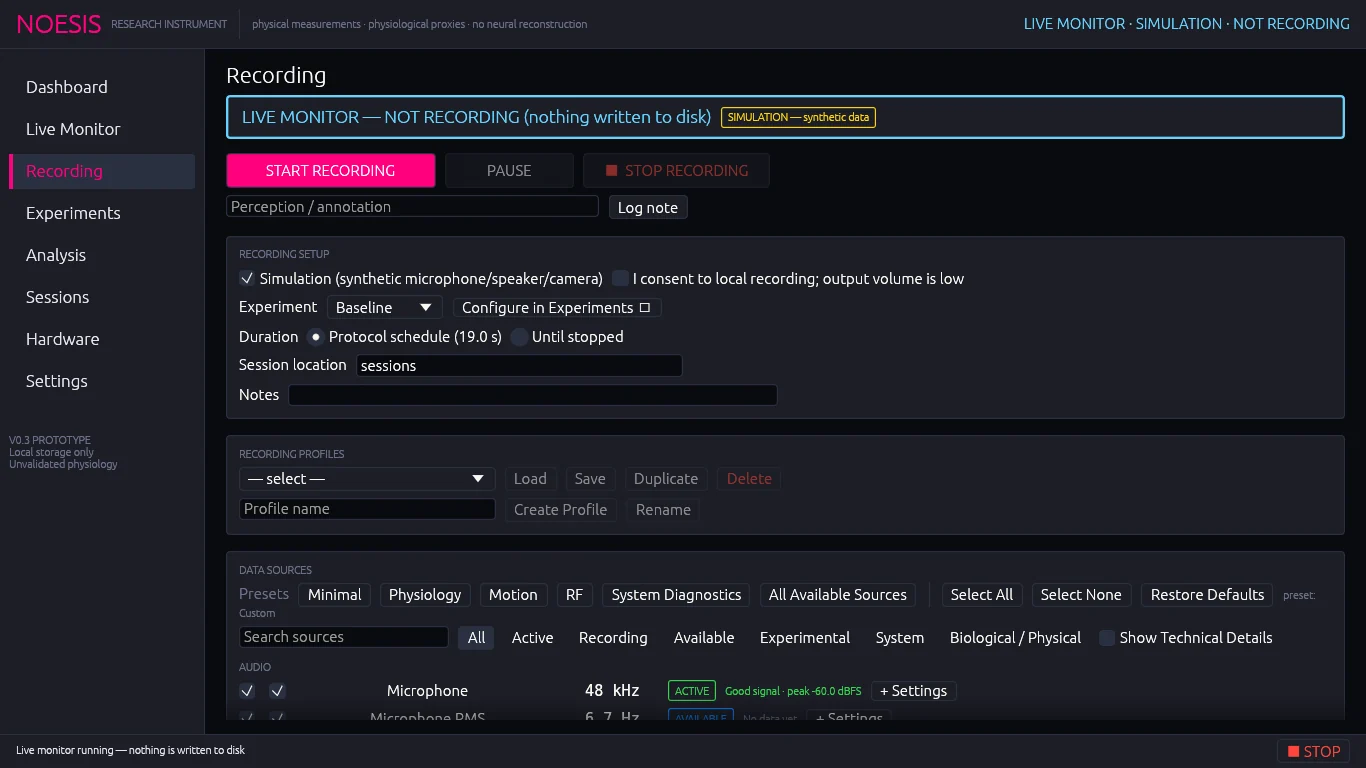
Run controls#
| Control | Action |
|---|---|
| START RECORDING | Starts a session with the current settings. Enabled when no recording is running and either Simulation or consent is ticked. A running live monitor is stopped first. |
| PAUSE / RESUME | Pauses writing. Acquisition and monitoring continue, but source records are not written until you resume. Pause and resume are logged as events in the session. |
| ■ STOP RECORDING | Ends the session and saves it. |
| Perception / annotation + Log note | Writes a timestamped note into the running session. |
Live recording status#
While recording or paused, a status card shows:
| Field | Meaning |
|---|---|
| Elapsed | Session time in seconds. |
| Active sources | Sources that delivered data in the last few seconds. |
| Data written / Records | Bytes and records written so far. |
| Dropped (acquisition / recorder) | Records lost before or during writing. Green at 0; red otherwise. |
| Monitor drops (display only) | Frames skipped by the live display only. Never affects the recording. |
| Disk backlog | Write queue depth out of 128; turns amber above 96. |
| Synchronization | Host clock, with or without a measured loopback latency. |
Recording setup#
| Setting | Use |
|---|---|
| Simulation | Uses synthetic microphone, speaker, camera and RF data. No hardware is opened for those sources. |
| I consent to local recording; output volume is low | Required for any real-hardware session. |
| Experiment | The protocol to run. Configure in Experiments jumps to its full settings. See Protocol reference. |
| Duration | Protocol schedule (N s) ends automatically when the trials finish; Until stopped keeps recording after the schedule until you stop. |
| Session location | Folder that receives session-<id> folders. Default sessions (relative to the launch folder). |
| Notes | Free text saved with the session. |
The Experiment drop-down chooses the protocol (trial schedule and stimulus). It does not choose which sources are recorded — that is the job of the Data sources table. An experiment only locks on the sources it requires and the stimulus logs it drives.
Record every data source#
To capture everything this computer offers in one session — including the RTL-SDR survey and Multimodal Synthesis:
Connect any devices you want included (RTL-SDR, controller, serial adapter) and open Hardware → Refresh discovery. For RF, complete RTL-SDR setup first so the receiver shows as available.
On Recording, set Experiment to
Baseline. Baseline plays no stimulus and requires nothing, so every source runs freely for the whole session. Choose Until stopped if you want an open-ended recording.In Data sources, click the preset All Available Sources. It ticks every available source except two opt-in sources: Bluetooth Signal Strength and HID Input Reports.
Tick Bluetooth Signal Strength in the table if you want passive BLE advertisement RSSI. For HID reports, pick a device in Hardware → HID → Capture input reports from, then tick HID Input Reports.
Expand RTL-SDR survey & Synthesis settings: confirm Enable RTL-SDR survey and Generate Synthesis from recorded sources are ticked, and choose a survey profile, span and IQ retention policy (IQ snippets are only kept when a policy other than
Disabledis chosen).Optional extras that are not in the source table: open a serial port (Hardware → Serial) and enable raw evdev streams on Linux (Hardware → Input).
Check the Recording summary: enabled source count and estimated disk use. Then tick consent and click START RECORDING.
Sources marked UNAVAILABLE, UNSUPPORTED or PERMISSION_DENIED cannot be ticked. Use the Available filter to see exactly what will be captured, and Optional permissions to unlock permission-denied inputs.
Profiles, RF and Synthesis panels#
Below the setup card are the Recording profiles panel and the collapsible RTL-SDR survey & Synthesis settings. When a survey or Synthesis is running, their live panels appear here too.
Data sources#
The source table lists every source NOESIS discovered, grouped by category. Each row has:
| Column | Meaning |
|---|---|
| First checkbox | Record this source. Greyed and locked on when the selected experiment requires it. |
| Second checkbox | Live monitor this source. |
| Name | Friendly source name. |
| Rate | Recorded rate (after any rate cap) or events. |
| Status + quality | Live status pill and signal-quality note. |
| + Settings | Opens the source's own settings. See Data sources & source settings. |
The row of buttons above the table applies presets (Minimal, Physiology, Motion, RF, System Diagnostics, All Available Sources), Select All, Select None and Restore Defaults. The current preset name is shown at the end of the row; any manual change marks it Custom.
Recording summary#
The last card lists the selected sources grouped by device with their recorded rates (camera as resolution, fps and frame stride), then:
Experiment          Baseline
Enabled sources     24
Expected duration   19.0 s
Estimated disk use  420.3 kB/s ≈ 8.0 MB total
Session location    sessions/session-<timestamp>
The estimate covers raw payload and index rows. Required and stimulus sources of the experiment are always recorded and included.