
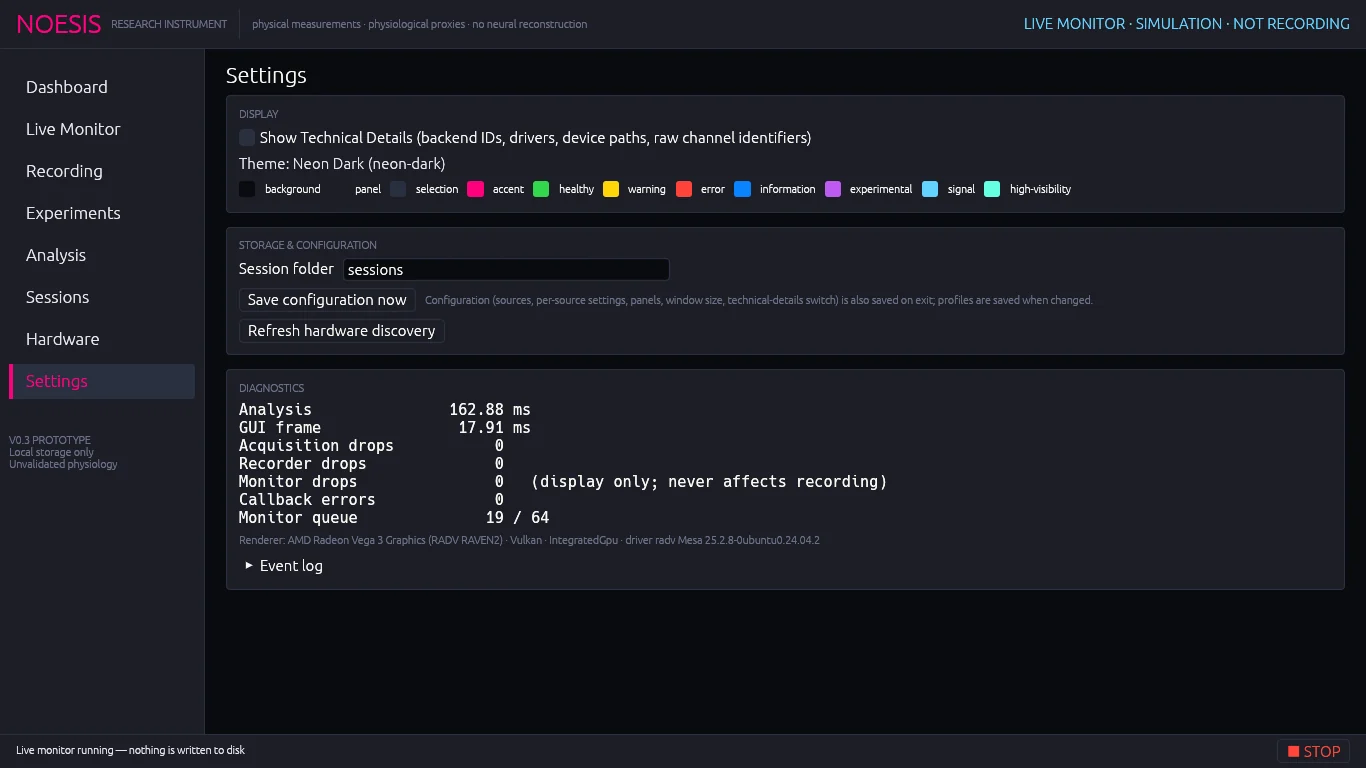
Display#
- Show Technical Details — shows backend IDs, drivers, device paths and raw channel identifiers throughout the console (source rows, Live Monitor cards, Hardware tables, session paths, microphone provenance). The same switch appears in every filter bar.
- Theme swatches of the Neon Dark palette: background, panel, selection, accent, healthy, warning, error, information, experimental, signal and high-visibility.
Storage & configuration#
| Control | Action |
|---|---|
| Session folder | Where new sessions are written (same field as Session location on Recording). |
| Save configuration now | Writes noesis-config.json immediately. Configuration — sources, per-source settings, expanded panels, window size, the technical-details switch and the open page — is also saved on exit. |
| Refresh hardware discovery | Same as Hardware → Refresh discovery. |
Profiles are saved separately to noesis-profiles.json whenever they change.
Diagnostics#
Analysis                 4.21 ms
GUI frame                3.87 ms
Acquisition drops           0
Recorder drops              0
Monitor drops               0   (display only; never affects recording)
Callback errors             0
Monitor queue               0 / 64
Acquisition and recorder drops should stay at 0; any non-zero value marks the session complete with gaps. The renderer line names the GPU adapter, backend and driver.
Event log#
Expand Event log to read the console's recent events, newest first: device status changes, session start and end, pauses, RF progress and errors.