
Configure an experiment#
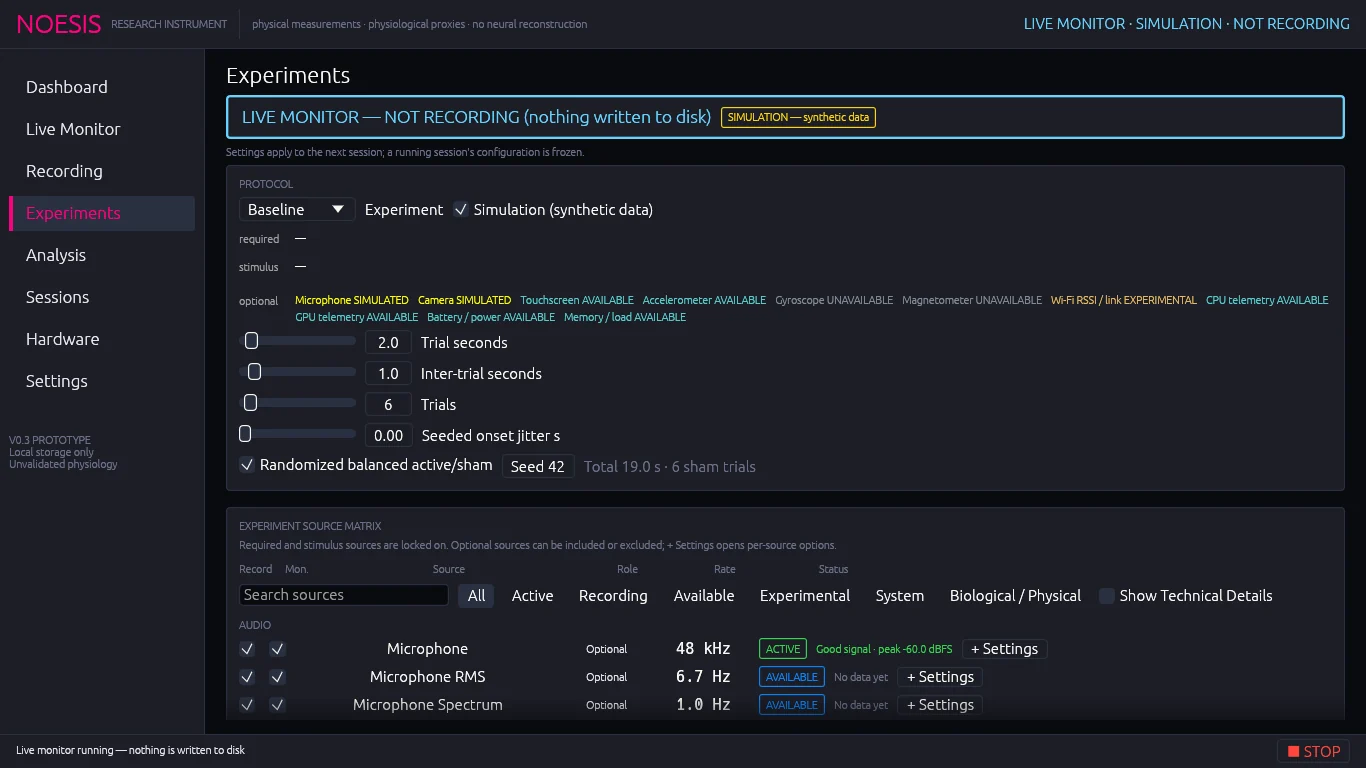
Open Experiments. In the Protocol card choose an Experiment and set Simulation as needed.
Read the requirements grid below it (see next section). A red Cannot start line names anything that is missing.
For audio protocols, set the Waveform and its parameters. For visual protocols, configure the visual stimulus. For haptic trials, configure the rumble settings.
Set the trial timing and randomization.
Review the Experiment source matrix, optionally save an experiment data profile, then start with the run controls at the bottom of the page (identical to the Recording page).
Requirements#
Each experiment declares three lists, each shown with the live status of every interface:
| List | Meaning |
|---|---|
| required | Must be usable or the session will not start. |
| stimulus | The output the experiment drives (speaker, display or haptic motor). |
| optional | Recorded when available. Every experiment includes accelerometer, gyroscope, magnetometer, Wi-Fi, CPU, GPU, battery and system telemetry as optional. |
With Simulation ticked, simulated interfaces are shown as SIMULATED and satisfy the requirement.
Audio stimulus parameters#
Shown for experiments that drive the speaker (AcousticTransfer, ContactExperimental, Multimodal, LoopbackCalibration):
| Setting | Range | Notes |
|---|---|---|
| Waveform | Sine, Chirp, Noise, Pulse, PRBS | Chirp sweeps start → end frequency; Pulse is a 10 ms click; PRBS is a pseudorandom binary sequence. |
| Start / carrier Hz | 20 – 10 000 (log) | Sine frequency, chirp start, PRBS chip rate. |
| Chirp end Hz | 20 – 10 000 (log) | Chirp end frequency. |
| Amplitude | 0 – 0.1 | Digital full scale, not sound pressure. Every trial has 10 ms ramps. |
| AM Hz | 0 – 50 | Amplitude modulation; 0 = off. |
Trial timing#
| Setting | Range | Meaning |
|---|---|---|
| Trial seconds | 0.1 – 30 | Length of each trial. |
| Inter-trial seconds | 0.1 – 10 | Gap between trials. |
| Trials | 1 – 100 | Number of trials. |
| Seeded onset jitter s | 0 – 5 | A reproducible random delay added to each onset so timing cannot be anticipated. |
The first trial starts 1 s after recording begins. Total length = 1 s + trials × (trial + inter-trial + jitter). The grey line under the controls shows the total and the number of sham trials.
Randomization and sham trials#
Randomized balanced active/sham makes half the trials sham (no stimulus) and shuffles them reproducibly using Seed. The same seed always produces the same order. Baseline, Sham and OpticalCalibration trials are always sham; LoopbackCalibration trials are always active.
Experiment source matrix#
The same source table as the Recording page with a Role column: Required, Stimulus, Optional or —. Required raw sources and stimulus logs are locked on. Use + Settings for per-source options.
Experiment data profiles#
The profile panel on this page stores the protocol, visual and haptic settings together with the source selection. See Presets & profiles.
Visual and reaction-time protocols need the GUI window. They are refused by headless command-line runs.